
+- XOR Userforum (https://forum.xor.eu)
+-- Forum: Products (https://forum.xor.eu/forumdisplay.php?fid=3)
+--- Forum: NerdSEQ (https://forum.xor.eu/forumdisplay.php?fid=6)
+---- Forum: General Questions (https://forum.xor.eu/forumdisplay.php?fid=17)
+---- Thread: Help for MIDI setup for multiple oscillators (/showthread.php?tid=1903)
Help for MIDI setup for multiple oscillators - Tamanoir - 12-07-2024
Hello
 ,
I am asking you for advice and help with configuring my setup.
I will try to summarize the problem, do not hesitate to ask me for details.
Context:
Before I could not leave my synth for more than a day with a patch due to lack of space. I am now lucky enough to have a small home studio. So I am looking to have a "ready to use" setup to make it easier to compose quickly, and spend less time plugging and unplugging instruments.
- Roland RC 505 Mk2 looper for guitar and bass
- Roland TR8S
- keystep 32
- Kenton MIDI Thru 5 (https://www.thomann.de/fr/kenton_midi_thru_5.htm)
Goal : I want the Nerdseq to be the brain of the setup. Currently I send a signal via midi out to a Kenton MIDI Thru 5 (MIDI multiplier).
The RC-505mk2 and the TR8S are well synchronized with the nerdseq.
I have 3 uDCO oscillators from soundforce (https://sound-force.nl/?page_id=4534), which I want to use in MIDI to avoid having to tune them each time.
Until now I used them in CV. I want to be able to link oscillators 1,2 and 3 using the midi channel 1,2 and 3 of the keystep 37 keyboard. And that in the nerdseq my patterns are recorded in tracks 1 2 and 3 as well. Not polyphonically or instantly.
Here is a image
: 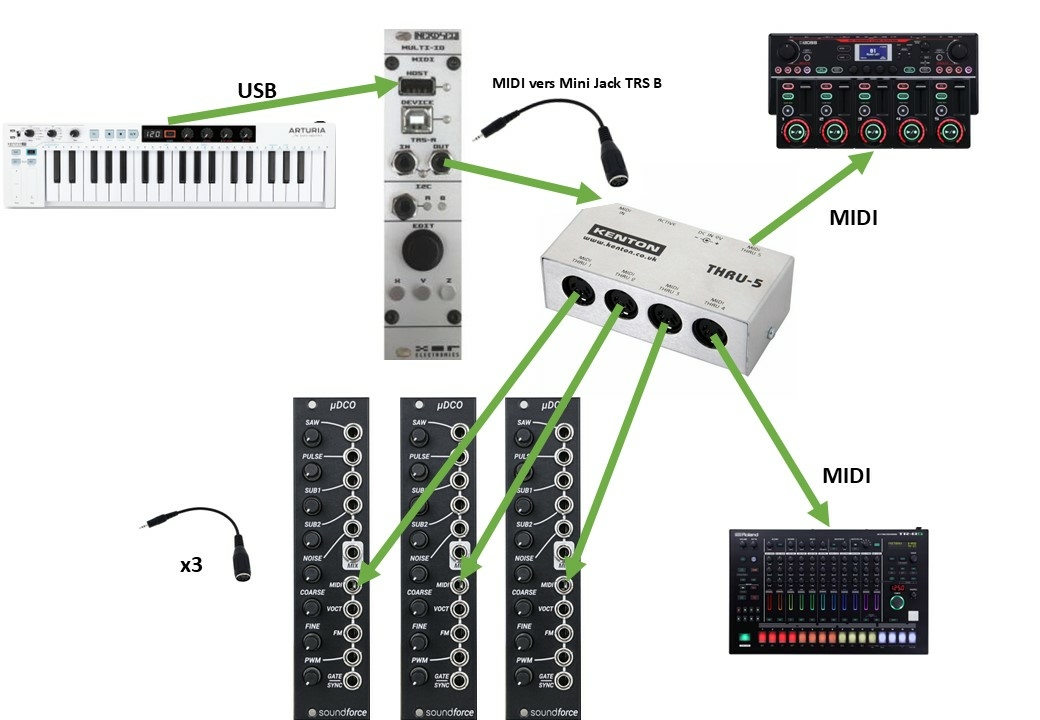
On the uDCOs, I set the midi only mode and I have buttons to select the right channel.
But I think my nerdseq configuration is actually not good.
Problems:
1) When my track is in cv, the nerdseq receives the signals well, I can play and record on the fly.
But to use the uDCOs I suppose I have to use tracks configured in MIDI.
But when I create a midi track, I see that the USB host and Midi out LEDs are flashing but the notes are not displayed in the nerdseq, I can neither play nor record. Do you have any ideas?
Here is how I configured the MIDI IC2 setup during my tests:
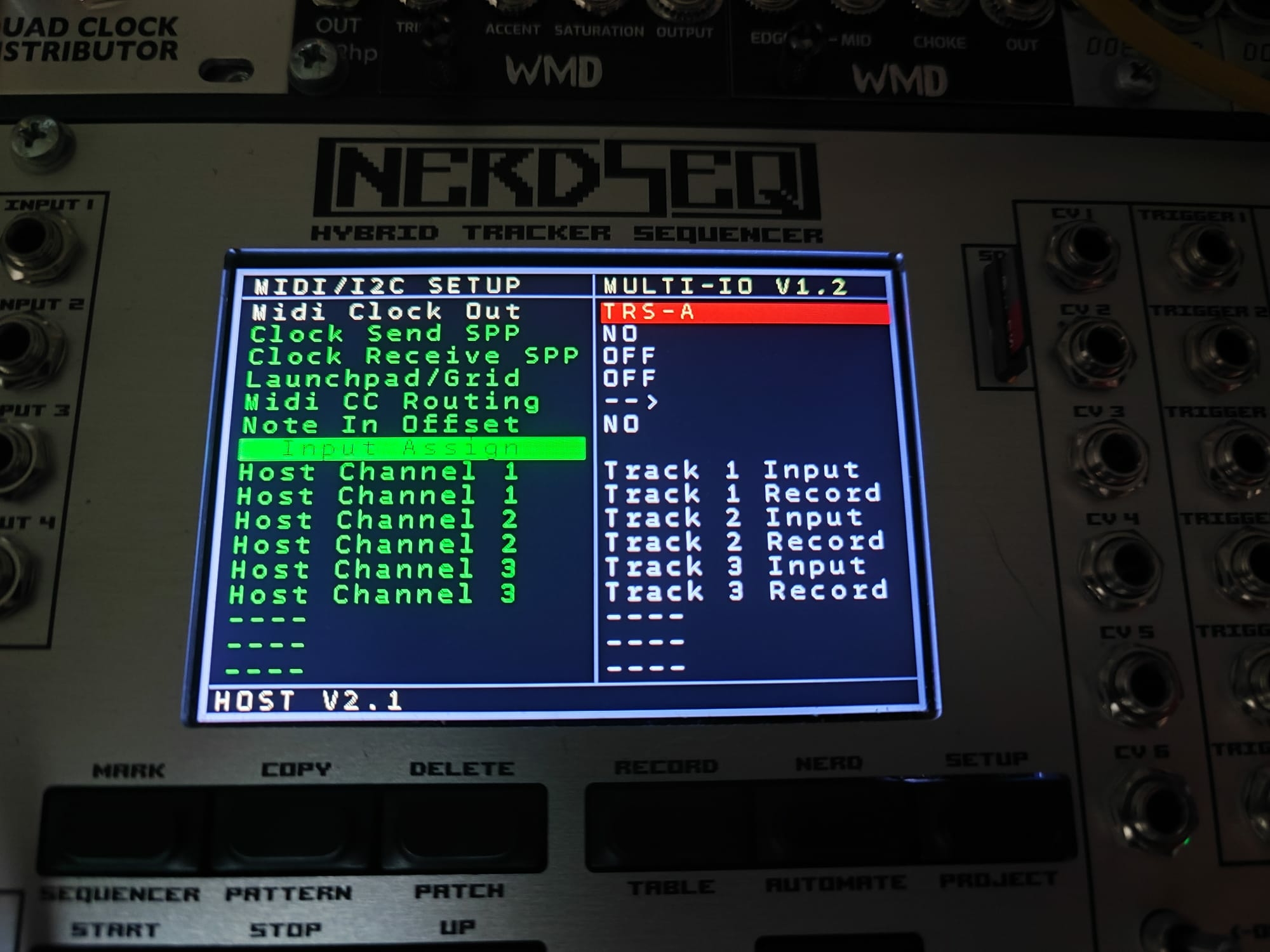
Here for example is a note (A4) that I can play without problem when my track is configured in CV, but which will no longer appear at this location when I switch to MIDI track
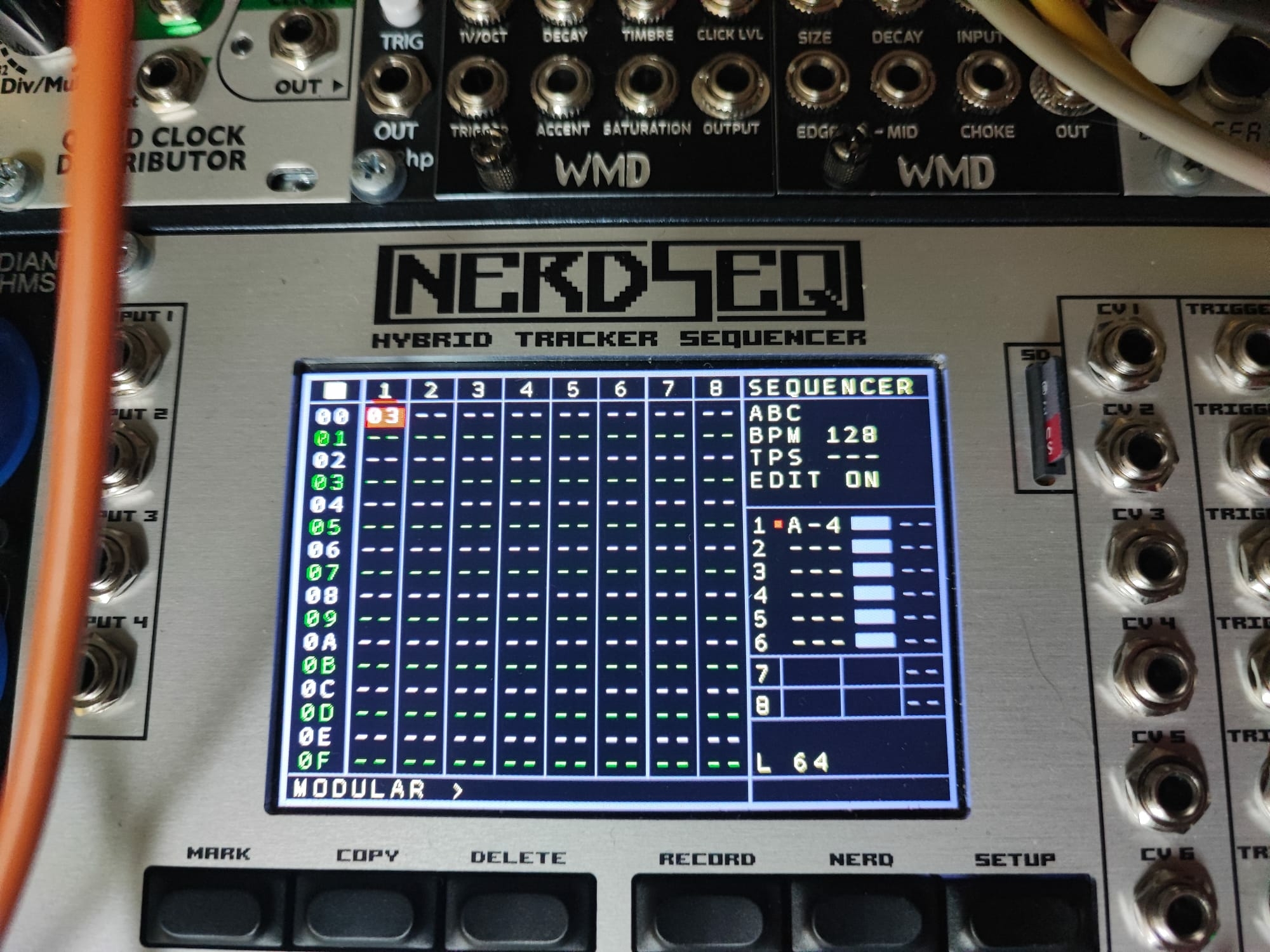
2) Finally there is another point: The jack ->5 Din adapter that I use between the nerdseq midi out and my MIDI multiplier is wired in TRS B, when I use the TRS A, the clock does not arrive correctly to the roland equipment. Should I use the same adapters for each oscillator?
Thanks for your help,
RE: Help for MIDI setup for multiple oscillators - XORadmin - 12-12-2024
Oh Hey I am sorry I missed this post!
At first, if you set the track to record it is not needed to set it to input as well in the Midi setup.
Like this would be enough already:
Host CH1 -> Track 1 Record
Host CH2 -> Track 2 Record
Host CH3 -> Track 3 Record
And the 3 tracks got to be assigned to be Midi tracks to be able to send out midi (in the basis configuration....they are tricks to avoid them being midi tracks. But lets get this running first)
Now for each Midi track you go to the Track setup of these and set record columns to 1, this will take care that it will play monophonic.
Each oscillator needs it's own Midi channel as well. You got to set the midi track channel then also to the oscillators channel.
That should work already for simple playing (if not recording) and also for recording.
If you want to go 'paraphonic' that would be easily possible as well. With that you would just use Host Channel1 -> Track 1 Record.
Track 1 set to Midi and in the track setup you choose 3 record columns. Also there you use the base Midi channel to the first oscillators channel, the Overule column 2 to the 2nd oscillator channel and the overrule 3 to the 3rd oscillator channel.
Now it would play the oscillators in paraphonic mode. Keep in mind that your single or multi pressed notes are always assigned to a 'free' oscillator. It's nice for some nice chords.
For your 2nd question. You need the TRS-A cable from the NerdSEQ to the kenton (the one which was delivered with the multi-IO. A TRS-B cable does not work.
And from the Kenton you use then the cable which is needed for the Roland (TRS-B I assume) and for the dco's as well the ones that belong to it. ( I couldn't find the info if the DCO use TRS-A or TRS-B. But as a general rule, the adapter is really from the Jack to the 5DIN. If it doesn't work in the begin then everything else won't work in the chain as well. Later in the chain switching from A to B won't do anything.
So lets assume the Roland got type B and the dco use type A then your setup would need to look like this:
NerdSEQ -> TRS-A -> DIN -> Kenton .....
- Kenton DIN-> TRS-B -> Roland
- Kenton DIN ->TRS-A -> DCO1 (eg set to Midi channel 1)
- Kenton DIN ->TRS-A -> DCO2 (eg set to Midi channel 2)
- Kenton DIN ->TRS-A -> DCO3 (eg set to Midi channel 3)
I hope that helps.
RE: Help for MIDI setup for multiple oscillators - Tamanoir - 12-14-2024
Hello and thank you for your response,
Quote:At first, if you set the track to record it is not needed to set it to input as well in the Midi setup.
Like this would be enough already:
Host CH1 -> Track 1 Record
Host CH2 -> Track 2 Record
Host CH3 -> Track 3 Record
And the 3 tracks got to be assigned to be Midi tracks to be able to send out midi
Ok done
Quote:(in the basis configuration....they are tricks to avoid them being midi tracks. But lets get this running first)
I'm curious but we'll come back to that later.
Quote:Now for each Midi track you go to the Track setup of these and set record columns to 1, this will take care that it will play monophonic.
Each oscillator needs it's own Midi channel as well. You got to set the midi track channel then also to the oscillators channel.
That should work already for simple playing (if not recording) and also for recording.
SO. I configured according to these instructions, but the keyboard behaves strangely.
When I enter notes while recording, the keyboard ends up playing the nerdseq track like a sequencer
I made a video without commentary, I don't speak English very well.
https://www.youtube.com/watch?v=UPe1V6UzhYs
Also Is it normal that notes are not displayed on the right of the main screen when I play?
Quote:If you want to go 'paraphonic' that would be easily possible as well. With that you would just use Host Channel1 -> Track 1 Record.It's very interesting thank you I'll keep it in the back of my mind, but first I'm going to focus on the basic setup
Track 1 set to Midi and in the track setup you choose 3 record columns. Also there you use the base Midi channel to the first oscillators channel, the Overule column 2 to the 2nd oscillator channel and the overrule 3 to the 3rd oscillator channel.
Now it would play the oscillators in paraphonic mode. Keep in mind that your single or multi pressed notes are always assigned to a 'free' oscillator. It's nice for some nice chords.
Quote:For your 2nd question. You need the TRS-A cable from the NerdSEQ to the kenton (the one which was delivered with the multi-IO. A TRS-B cable does not work.We agree on the connection
And from the Kenton you use then the cable which is needed for the Roland (TRS-B I assume) and for the dco's as well the ones that belong to it. ( I couldn't find the info if the DCO use TRS-A or TRS-B. But as a general rule, the adapter is really from the Jack to the 5DIN. If it doesn't work in the begin then everything else won't work in the chain as well. Later in the chain switching from A to B won't do anything.
So lets assume the Roland got type B and the dco use type A then your setup would need to look like this:
NerdSEQ -> TRS-A -> DIN -> Kenton .....
- Kenton DIN-> TRS-B -> Roland
- Kenton DIN ->TRS-A -> DCO1 (eg set to Midi channel 1)
- Kenton DIN ->TRS-A -> DCO2 (eg set to Midi channel 2)
- Kenton DIN ->TRS-A -> DCO3 (eg set to Midi channel 3)
Nicolas from Soundforce answered me on this subject, no difficulty there.
“Both are accepted!” The module automatically biases MIDI. »
Ok, for the moment it doesn't work but I have doubts about the adapters I have, because there is nothing to visually identify them
 . I'm going to get a new TRS-A cable to continue testing.
I will first try to understand how to ensure that the USB host socket does not send information to the keystep.
Thanks for the advice
RE: Help for MIDI setup for multiple oscillators - XORadmin - 12-14-2024
Just a short observation. You send the notes to the host = to the keystep which is wrong. The keystep might indeed do somethting as it recognizes the note as commands.
Set the Midi track to TRS-Midi in the Track Setup of the Midi Track and you will be one step further.
RE: Help for MIDI setup for multiple oscillators - XORadmin - 12-14-2024
(12-14-2024, 09:15 AM)XORadmin Wrote: Just a short observation. You send the notes to the host = to the keystep which is wrong. The keystep might indeed do somethting as it recognizes the note as commands.
Set the Midi track to TRS-Midi in the Track Setup of the Midi Track and you will be one step further.
And:
Quote:Also Is it normal that notes are not displayed on the right of the main screen when I play?With a Midi track it can be 4 notes so that doesn't make sense if you want to show 8 tracks. There is not enough space for more than 8 track indicators.
RE: Help for MIDI setup for multiple oscillators - Tamanoir - 12-18-2024
Hi,
Thanks for the advice, everything seems to work well

I didn't have time to try the paraphonic configuration, but it could be very fun too
Let me come back to this point:
Quote:(in the basis configuration....they are tricks to avoid them being midi tracks. But lets get this running first)
I'm curious about the configuration to set up.
Would this allow you to use the CV and Trigger output of the nerdseq in addition to the MIDI note and gate information which goes directly into the oscillators?
Thanks for taking the time
RE: Help for MIDI setup for multiple oscillators - Tamanoir - 12-20-2024
By consulting the manual, you may be talking about the following function:
Quote:- Clone to Modular → If enabled, the midi notes and note off from the first note column is
also being sent/cloned to the local CV and gate output of the track
I'm going to try this out as soon as I get the chance.
There is something I am currently investigating. When playing and recording a MIDI track with a column, is it possible to give priority to the last note played?
Currently I have to completely release the piano key to enter a new note.
I'm trying to make it so that a new piano key played while another is already active takes over from the first one.
All while remaining in mono and on a single oscillator.
I'm happy to have almost reached the end of this new setup, the midi tuning is very practical, I must admit even if a non-academic tuning can have its charm
RE: Help for MIDI setup for multiple oscillators - Tamanoir - 12-23-2024
I found the answer in the following topic
https://forum.xor.eu/showthread.php?tid=1893
The function is not yet available, but it is true that in my case it will be very practical and allows to make the different channels really independent in my use case.
Sorry for the dialogue with myself, but it allows to centralize the information that may be useful to someone else in the future
RE: Help for MIDI setup for multiple oscillators - XORadmin - 12-29-2024
(12-23-2024, 11:48 AM)Tamanoir Wrote: I found the answer in the following topic
https://forum.xor.eu/showthread.php?tid=1893
The function is not yet available, but it is true that in my case it will be very practical and allows to make the different channels really independent in my use case.
Sorry for the dialogue with myself, but it allows to centralize the information that may be useful to someone else in the future
I think it is not exactly as in the topic as the topic refers to what the sequence plays instead of what you play live from midi.
I will look into the midi thing again as I defintiely agree with you that it is not the perfect solution right now for a midi track.