| Welcome, Guest |
You have to register before you can post on our site.
|
| Forum Statistics |
» Members: 1.812
» Latest member: snkyfkr
» Forum threads: 2.067
» Forum posts: 12.140
Full Statistics
|
| Online Users |
There are currently 71 online users.
» 0 Member(s) | 68 Guest(s)
Applebot, Baidu, Google
|
| Latest Threads |
FW Update of VEX does not...
Forum: Beauty and less important bugs/glitches
Last Post: mgd
11-02-2026, 03:39 PM
» Replies: 0
» Views: 29
|
Feature Request: Mapping ...
Forum: Feature requests
Last Post: XORadmin
11-02-2026, 12:51 PM
» Replies: 1
» Views: 69
|
One Time Trig
Forum: NerdSEQ
Last Post: XORadmin
11-02-2026, 12:42 PM
» Replies: 1
» Views: 47
|
Broken Redirect Links?
Forum: Website issues
Last Post: fossilizeme
11-02-2026, 03:26 AM
» Replies: 0
» Views: 44
|
Random choices
Forum: General Questions
Last Post: joesh
10-29-2026, 10:35 PM
» Replies: 2
» Views: 78
|
Release Candidate Firmwar...
Forum: Firmware / Manual
Last Post: XORadmin
10-29-2026, 08:35 PM
» Replies: 20
» Views: 2.597
|
Ratchet Randomly or Just ...
Forum: General Questions
Last Post: dangerBreak
10-29-2026, 08:00 PM
» Replies: 6
» Views: 185
|
Output a clock divider on...
Forum: General Questions
Last Post: XORadmin
10-28-2026, 10:34 PM
» Replies: 2
» Views: 101
|
Hallucinatory MIDI CC com...
Forum: Beauty and less important bugs/glitches
Last Post: XORadmin
10-28-2026, 10:02 PM
» Replies: 7
» Views: 1.388
|
Option to set Range on Ra...
Forum: Feature requests
Last Post: XORadmin
10-28-2026, 10:01 PM
» Replies: 2
» Views: 122
|
|
|
 Help for MIDI setup for multiple oscillators |
|
Posted by: Tamanoir - 12-07-2024, 01:21 AM - Forum: General Questions
- Replies (8)
|
 |
Hello  ,
I am asking you for advice and help with configuring my setup.
I will try to summarize the problem, do not hesitate to ask me for details.
Context:
Before I could not leave my synth for more than a day with a patch due to lack of space. I am now lucky enough to have a small home studio. So I am looking to have a "ready to use" setup to make it easier to compose quickly, and spend less time plugging and unplugging instruments.
Goal : I want the Nerdseq to be the brain of the setup. Currently I send a signal via midi out to a Kenton MIDI Thru 5 (MIDI multiplier).
The RC-505mk2 and the TR8S are well synchronized with the nerdseq.
I have 3 uDCO oscillators from soundforce (https://sound-force.nl/?page_id=4534), which I want to use in MIDI to avoid having to tune them each time.
Until now I used them in CV. I want to be able to link oscillators 1,2 and 3 using the midi channel 1,2 and 3 of the keystep 37 keyboard. And that in the nerdseq my patterns are recorded in tracks 1 2 and 3 as well. Not polyphonically or instantly.
Here is a image :
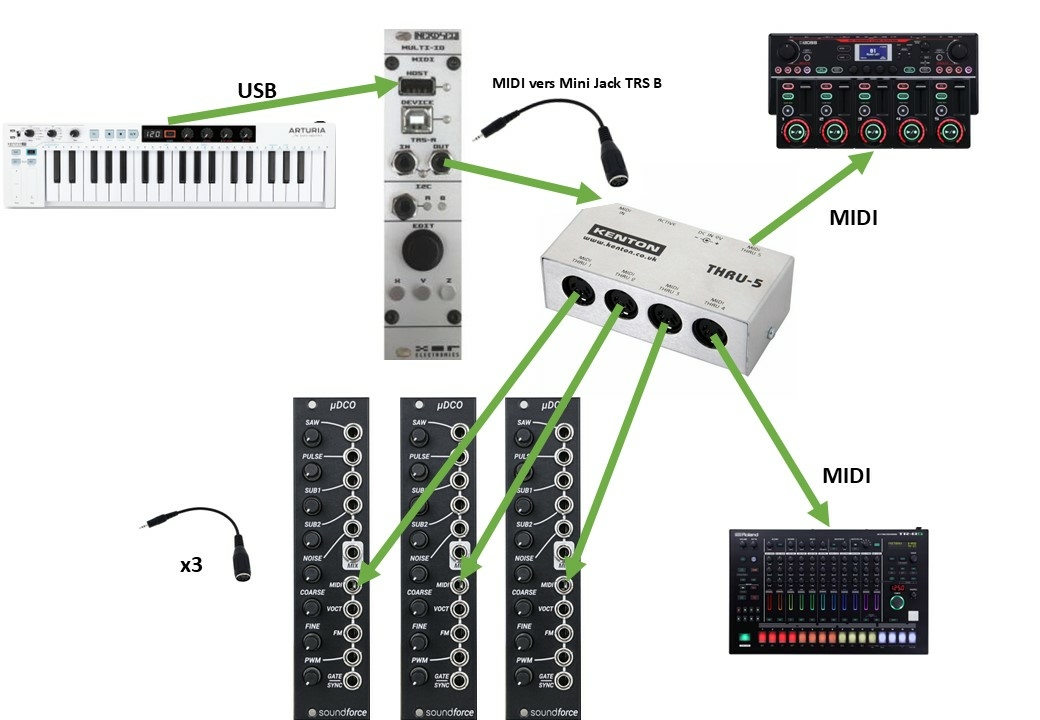
On the uDCOs, I set the midi only mode and I have buttons to select the right channel.
But I think my nerdseq configuration is actually not good.
Problems:
1) When my track is in cv, the nerdseq receives the signals well, I can play and record on the fly.
But to use the uDCOs I suppose I have to use tracks configured in MIDI.
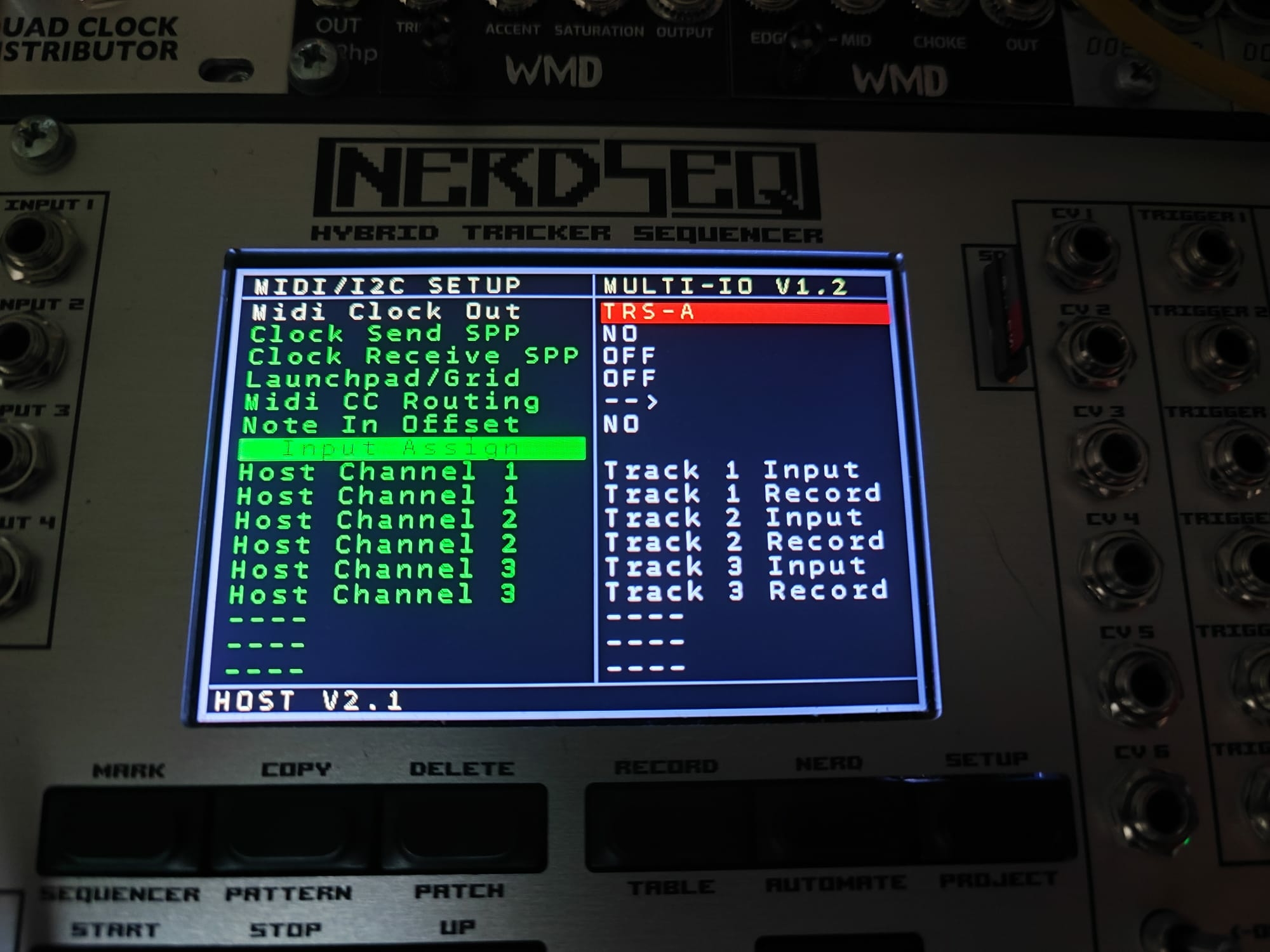
But when I create a midi track, I see that the USB host and Midi out LEDs are flashing but the notes are not displayed in the nerdseq, I can neither play nor record. Do you have any ideas?
Here is how I configured the MIDI IC2 setup during my tests:
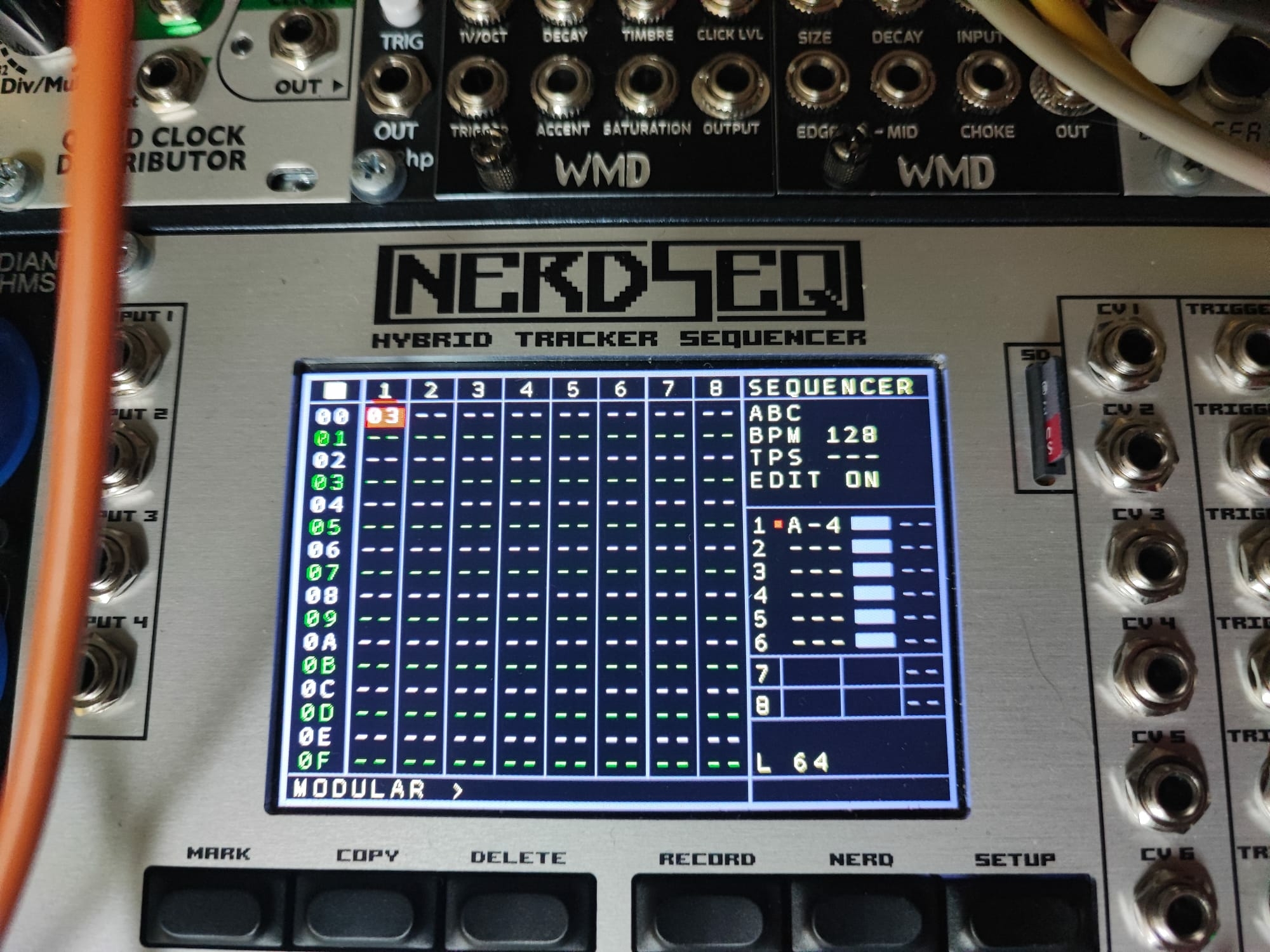
Here for example is a note (A4) that I can play without problem when my track is configured in CV, but which will no longer appear at this location when I switch to MIDI track
2) Finally there is another point: The jack ->5 Din adapter that I use between the nerdseq midi out and my MIDI multiplier is wired in TRS B, when I use the TRS A, the clock does not arrive correctly to the roland equipment. Should I use the same adapters for each oscillator?
Thanks for your help,
|

|
|
| EX.VOX NOTE and EX.VOICE NOTE? |
|
Posted by: OhJay - 12-05-2024, 04:48 AM - Forum: General Questions
- Replies (2)
|
 |
hey folks what's the difference between EX. VOX NOTE and EX. VOICE NOTE in the i2c/multi setup. what is the "correct" way to play basic chords/melodies and control parameters? does anyone have a favorite way of controlling the disting ex via i2c?
thanks
|
|
|
|
| Understanding Glide Resolution |
|
Posted by: sync_mutex - 12-03-2024, 12:15 PM - Forum: General Questions
- Replies (2)
|
|
I am trying to wrap my head around how glide resolutions work, for both CV and MOD glides.
I wasn't able to find some documentation, but if I missed something please point me there.
First thing I noticed is that when I increase the resolution I actually see more aliasing/less smoothing of cv values, where I expected the opposite to happen.
Also I cannot really make sense of what Glide values to use together with Glide resolution values.
Can someone maybe provide a formula or some examples on how they are supposed to work and be used so I can gain some understanding?
Cheers
|
|
|
|
| Tempo issues using MCON in Mappings? |
|
Posted by: kriskeyman - 11-26-2024, 04:17 AM - Forum: General Questions
- Replies (2)
|
|
Hello,
I’m running into an issue where MCON commands in Mappings are unexpectedly modifying the tempo for the project.
Clock In is set to MOD.CLOCK (issue also occurs when set to Internal)
Clock Out is set to DIN-SYNC24.
Clock/Reset Outputs of Nerdseq are going to Pam’s New Workout.
MULTI-IO is connected to MIDI interface via TRS-A sending clock to Bitwig.
I only have two rows populated in Mappings:
MCC HC1 #32 > MCON TC10 #91 (modifies Machinedrum delay send from Sweet16 slider)
I2C SCCV #0 > MCON TC10 #10 (modifies Machinedrum track level from F8R via I2C)
When I move slider #32 on Sweet16, there is a BPM change of ~3 bpm noticed on PNW & Bitwig.
When I move slider #0 on F8R, there is a BPM change of ~1 bpm noticed on PNW & Bitwig.
In both cases, the tempo fluctuates while the slider is being moved, then returns to correct tempo once slider stops moving.
All is working fine except for the unexpected tempo changes when moving sliders that shouldn’t be linked to tempo at all. I have also tried changing Machinedrum base channel to 13 (and modifying mapping to TC13) and the issue persists.
Any guidance for where to begin troubleshooting would be appreciated.
Is there a way to modify mappings so the above does not modify tempo, or is something incorrect in setup, or is this a bug?
|
|
|
|
| Black Friday 2024 |
|
Posted by: XORadmin - 11-25-2024, 09:55 AM - Forum: Company News
- No Replies
|
 |
Around Black Friday deals at XOR Electronics. - NerdSEQ, Expanders... -
It's 2024 and so all currently available modules get a 24% discount at the XOR Electronics webshop.
If you ever wanted to get your hands on the most powerful sequencer in the rack (or its expander modules) then this is your chance.
Start 28-11-2024 0:00 CET
End 01-12-2024 23:59 CET
Use the following coupon code: BFF2024
The Dualchord and T-Shirts which will also be available then are excluded from the discount.
https://xor-electronics.com/
|
|
|
|
| Dualchord Expander |
|
Posted by: XORadmin - 11-22-2024, 11:40 AM - Forum: NerdSEQ Expanders
- Replies (34)
|
|
Now that the Dualchord is going to be released soon I thought it would be a good idea to start the official Dualchord thread.
Here added to modulargrid:
https://modulargrid.net/e/xor-electronics-dualchord
I will put it up into the webshop when the black friday deals start (no deal for this one), other shops will follow up. Shipping starts in the 1st/2nd week of december.
There will be more and more information over the next days.
Basic specs:
Dualchord 6HP Expander, (uses 1 NSA channel)
- 2 x 4 voice oscillator with each 4 freely mixable waveforms (Sine, Triangle, Sawtooth, Pulse (with PWM). 32 waveforms running at the same time
- 2 audio outputs for each 4 oscillators
- 2 Trigger/Gate outputs
- 8 integrated LFO freely assignable (also syncable)
- 4 Knobs freely assignable to all Dualchord functions
- Stereo-ish modes (dephase, detune)
- PWM, Oscillator spread, mini-super-saw, glide, detune, multi-octave chords, preset chord modes
- waveform morph modes
- dedicated tracktype to support all dualchord functions, columns for all 8 oscillators and Trigger/gate
- full mapping support
....
Price 169€ (ex VAT)
https://xor-electronics.com/downloadfile...d_info.pdf
There will be either a promo video or I will make a live-stream going through its current functions. To be announced...
|
|
|
|
| 2HP MIDI exander - confused |
|
Posted by: kilgore - 11-14-2024, 09:10 AM - Forum: NerdSEQ Expanders
- Replies (6)
|
|
Hi there!
My 2hp MIDI expander arrived yesterday and I'm trying to use it to control the Arturia Microfrek, so far unsuccessfully.
So the expander is plugged into the Nerdseq and recognized. I've got Track 8 setup as a MIDI track.
I have the OUT of the expander going into the MIDI IN on the Microfreak using a TRS A->B dongle (Arturia uses TRS B).
I'm sending out from the Nerdseq on MIDI channel 1, and the Microfreak is also set to receive on channel 1.
Question 1) Do I need to connect the "SAMPLE 8" Output to the "IN" jack of the expander, or is MIDI already being sent out through the connection between the expander and the Nerdseq?
Just not sure what I'm doing wrong. Something on the Nerdseq not setup right? Something on the Microfreak? Wrong cables?
Thanks for any help!
|
|
|
|
| Mapping an offset for Live Recording CV |
|
Posted by: kaminiello - 11-01-2024, 09:25 PM - Forum: General Questions
- Replies (2)
|
|
H i everybody,
Maybe you could help me with that as i am new to the mapping world.
I would love to generate an offset through the mapping function for live CV recording.
As far as I understood CV Input is 0V - 10V and CV Outs (offset to the right) are 0V - 10V as well.
So if i receive eg a sequence from a Sequencer with the same values Nerdseq would record same notes,
same CV values and could pass through all accordingly. If sources are different (eg external Quantizers with
different Volt Value bases) I would need to offset in order to sync to Nerdseq's range.
I am using a Neo Trinity to give out quantized random voltage (which comes -5V - +5V) and would like to record those
sequences into Nerdseq. Is there any chance to program a mapping rule that all the incoming voltages would be offset
to Nerdseq's -V - 10V automatically ? I tried the Chat GPT "Mapping Maestro" nut somehow it doesn't get it right with the
translation.
Same issue i have if I link the Bard Quartet Quantizer which gives out -3V - +7V
Could you help me with that ?
Thanks a lot
|
|
|
|
|


 .
